

Ace your FRCS Exam
High-yield FRCS preparation
Key Features:
-
130 AI Video Explainers
-
65 hours of AI Podcasts Deep Dives
-
500 pages of Revision Notes (Q&A Format)
-
500 MCQs
-
Key Papers, Classification & MCQ Tips
Learn efficiently through mnemonics & learning aids. Progress tracking to keep you on course.
The Ultimate Online FRCS Course
Build a strong foundation in FRCS Basic Science with a comprehensive online course designed specifically for orthopaedic trainees.
Whether you’re starting from scratch or refreshing your knowledge before the exam, this course provides a clear, structured learning pathway that takes you from the fundamentals to exam-ready confidence.
A Complete, Step-by-Step Curriculum
The course is organised into 20 high-yield modules, carefully designed to break complex topics into manageable sections.
Each module builds on the previous one, allowing you to develop your understanding progressively rather than memorising isolated facts. By following the course in sequence, you’ll gain the knowledge and confidence needed to tackle the FRCS Part 1 examination.
OrthoRevision 5-Step Learning System
Every module follows the proven OrthoRevision 5-Step Learning System, helping you understand, retain, and apply the core concepts:
-
AI Video Overviews
-
Start each topic with concise presentation-style videos that introduce the key concepts and provide the essential framework for learning.
-
-
AI Podcast Deep Dives
-
Reinforce your understanding with podcast-style discussions that explore the important principles, clinical relevance, and high-yield exam themes.
-
-
Revision Notes
-
The heart of the course. Comprehensive revision notes presented in the signature OrthoRevision Question & Answer format
-
Designed to explain concepts clearly while focusing on the questions most commonly tested in the FRCS examination.
-
-
Landmark Papers & Classifications
-
Master the essential evidence base with dedicated sections covering the landmark papers, classic studies, and key classifications that frequently appear in the exam.
-
-
MCQs & Exam Tips
-
Finish each module with:
-
High-yield exam pearls and frequently tested facts
-
Common MCQ pitfalls and revision tips
-
A 25-question module-specific MCQ test to consolidate your learning and track your progress
-
-
Designed for Busy Trainees
Learn wherever and whenever suits you. The course is completely self-paced, allowing you to study around clinical commitments while following a structured programme that keeps your revision focused and efficient.
By combining videos, podcasts, written notes, landmark evidence, and exam-style questions, OrthoRevision provides everything you need to prepare for FRCS Part 1 Basic Science in one place.
Modules










Module Content
Bone | Module 2
Topics
-
Structure & Function
-
Blood Supply
-
Bone Injury
-
Bone Healing
-
Non-Union
-
Bone Grafting
-
Calcium & Phosphate Metabolism
-
Vitamin D, Calcitonin & PTH
Papers & MCQs
-
Papers & Classifications
-
MCQ Top Tips
-
MCQ Quiz (SBA)
Topic Resources
-
AI Video Explainer
-
AI Podcast Overview
-
Revision Notes (Q&A Style)
Accessing Modules
To access the module, you must first subscribe via the website’s subscription page. Once registered, you will be able to enrol in your chosen modules and begin learning immediately.
How to Enrol
-
Click the “Learn” link and select your desired module
-
The module will then appear in the “Programs” section of your membership area
-
You can access this via the membership icon in the top right-hand corner
-
Your dashboard will display active modules and percentage completion
-
You need to enroll in all modules to see them in your membership area
After Enrolment
-
Modules can be accessed at any time and completed at your own pace
-
We recommend completing each section fully before progressing to the next
-
A structured content checklist is provided to help track your progress
Working through Modules
For optimal learning, we recommend using a laptop or desktop alongside a notepad to actively engage with the material—making notes, sketching diagrams, and consolidating understanding in real time.
The module is also accessible on mobile devices via the “Spaces by Wix” app (see below), allowing flexible learning during work or commuting.
Navigating the Interface
-
Blue content menu is displayed on the left-hand side of the participant page
-
Orange tabs indicate module subheadings
-
Expand each section using the white arrow to reveal detailed content
Study Approach
-
Work through the content sequentially to follow the structured learning pathway
-
Use full-screen mode (top right corner) for an enhanced learning experience
-
Minimise the side menu using the arrow next to the module title for a distraction-free view
-
Content is delivered in a clear, interactive question-and-answer format to reinforce understanding and support active recall.
Completing a Section
-
Click the “Complete” button to mark progress
-
Track your advancement through the module
-
Progress confidently to the next topic
-
Earn module badges as you complete each section
OrthoRevision's 5-Step Learning Process
1
2
3
4
5
Watch Video
Start with concise videos introducing the key concepts and framework
Listen to Podcast
Reinforce learning with pod-cast style discussions exploring exam common themes
Revision Notes Q&A
In-depth A&A notes covering the most important exam content
Review Evidence
Master essential evidence, landmark papers and key classifications
Test Knowledge
Test your knowledge with MCQs and learn high-yield pearls and exam tips
Learn Anytime. Anywhere.
On the OrthoRevision App.
Learn OrthoRevisionFRCS wherever you go.
The OrthoRevision FRCS App gives you instant access to your complete learning platform, including videos, AI podcasts, revision notes, landmark papers, classifications, and MCQ tests.
Study at your own pace, pick up exactly where you left off, and revise anytime, anywhere. Available on iOS and Android.
Choose a Module
Browse and enroll in
any FRCS Course
Follow 5-Step System
Work through steps at own pace
Test, Track & Improve
Complete MCQs, track progress, keep improving
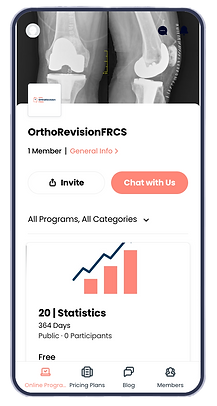


OrthoRevisionFRCS App
How to Join.
How to Access
You can easily access your Revision modules from your phone or iPad using the Spaces by Wix app. Follow these simple steps to get started:
-
Download the App:
Go to the App Store and search for “Spaces by Wix”.
Download the app and create an account using the same email and login details as your MRCS Revision account. -
Join the OrthoRevision FRCS Member Area:
Once logged in, join the MRCS Revision community by searching for “MRCS Revision” within the app, or click the link below to access directly: OrthoRevision FRCS App Link
You will need to scan QR code to join automatically -
Enroll in Your Modules:
Choose the module you wish to study and enroll (links below). Each module is broken down into structured subsections, allowing you to follow a clear learning path.
Sorting Categories
-
To access your programs go onto "online programs"
-
There is a dropdown which initially states "All Programs, All Categories"
-
If you click on this button you can organise by category of program
-
For instance basic science - will bring all the basic science modules
-
This will allow you to order your modules for structured revision
-
Module Links
Click on below links & scan QR Code


.png)


